
I Built a CI/CD Pipeline Using CircleCI and Github. This is What I Learned
Part 1 of X

Note* Any opinions expressed in this blog post are subject to change as I learn more.
Why Even Bother?
I’m going to be getting my Salesforce Application Architecture Certification. This is definitely “off the beaten path” when it comes to my studying, but I WANTED a better understanding of CI/CD, considering I’ve worked on numerous projects using tools like Jenkins, etc.
I learn best when I can get my hands on things. I prefer training Jiu-Jitsu instead of watching, and I definitely prefer configuring Salesforce (seeing what effect certain settings have) instead of listening to lectures.
We Use Big Words But Have Absolutely No Idea What They Truly Mean
How many times have you looked at documentation for something and asked yourself, “WTF did I just read?”
This substack and future ones will be my attempt to truly understand technology, mainly Salesforce and related tools. If I can’t explain the concepts necessary use these tools to a child, then I simply don’t know them deep enough. This and future posts will be an attempt at that. I’m mainly going to be speaking in Salesforce terms, because that’s what I know.
What is CI/CD?
CI/CD stands for continuous integration, continuous deployment, and/or continuous delivery, but what does that even mean?
Imagine you’re building a brick house. Typically, you’d build it by laying down one brick at a time, but what if you encountered issues with some bricks? There’s obvious flaws most people could see (cracked bricks, for example). What about the not-so-obvious flaws like structural problems that come from having bricks arranged in the wrong formation?

This is a pretty extreme example, and if someone built my house like this, I’d rather sleep in the street.
Now imagine if a machine existed that could check every brick for cracks or other flaws (sizing, etc.). Say I add a brick with a flaw, our machine would tell us. It’s doing automatic inspections of our bricks. This is continuous integration (CI).
Let’s take things a step further. What if we were to have the same machine put those bricks on a conveyor belt which drops them into the perfect spot for building our house as soon as they pass inspection? Then, we could sit back and monitor the progress of the house being built. This is continuous deployment.
What if you wanted to manually approve every inspected brick before it’s automatically layed? This is continuous delivery.
So CI/CD is essentially a set of automated processes that you (or someone in your organization) define which allows code (our bricks) to be deployed (placed) to a destination with ideally zero issues (sometimes you have to put out an unforeseen fire). This process is usually facilitated by software that we configure to handle our CI/CD process.
Why does CI/CD for Salesforce Matter?
When I was an analyst, none of this stuff made any sense to me. To put it simply, CI/CD for Salesforce matters because:
It allows us to quickly move our changes across environments.
It helps developers catch their mistakes early, which results in them delivering higher quality solutions to the challenges that businesses face.
Imagine being the developer of a 15 year old Salesforce org which had tons of code and the company had no CI/CD. Any small change you make in an environment would require tons of regression testing which could take weeks because you have nothing that can automatically test and review what you’ve done. This typically don’t happen with CI/CD, which would also ensure that what you’re building is functional as well.
Quick Note: Many companies still do manual code reviews along with CI/CD because they want to make sure that “garbage code” isn’t going into production. Just because something “works” doesn’t mean it was done right and we need to minimize the amount of technical debt that is introduced.
For those who aren’t technical, an “environment” is essentially your software. You can have multiple “environments”, each with a specific purpose. The most common purpose of additional environments is to build and test new features that may or may not be released to your "production” (think of the version of your software that all your users have access to daily) environment.
“Technical debt” is essentially the set of problems that are introduced into a business because of how something was done. When it comes to code, “garbage code” can do things like cause bugs or have noticeable performance issues which affect a businesses users and costs the business money.
What did I Use to Build My Pipeline?
This is what I used:
A Developer Edition of Salesforce
Use the link above and sign up for a free Developer Edition of Salesforce. This is perfect for projects.
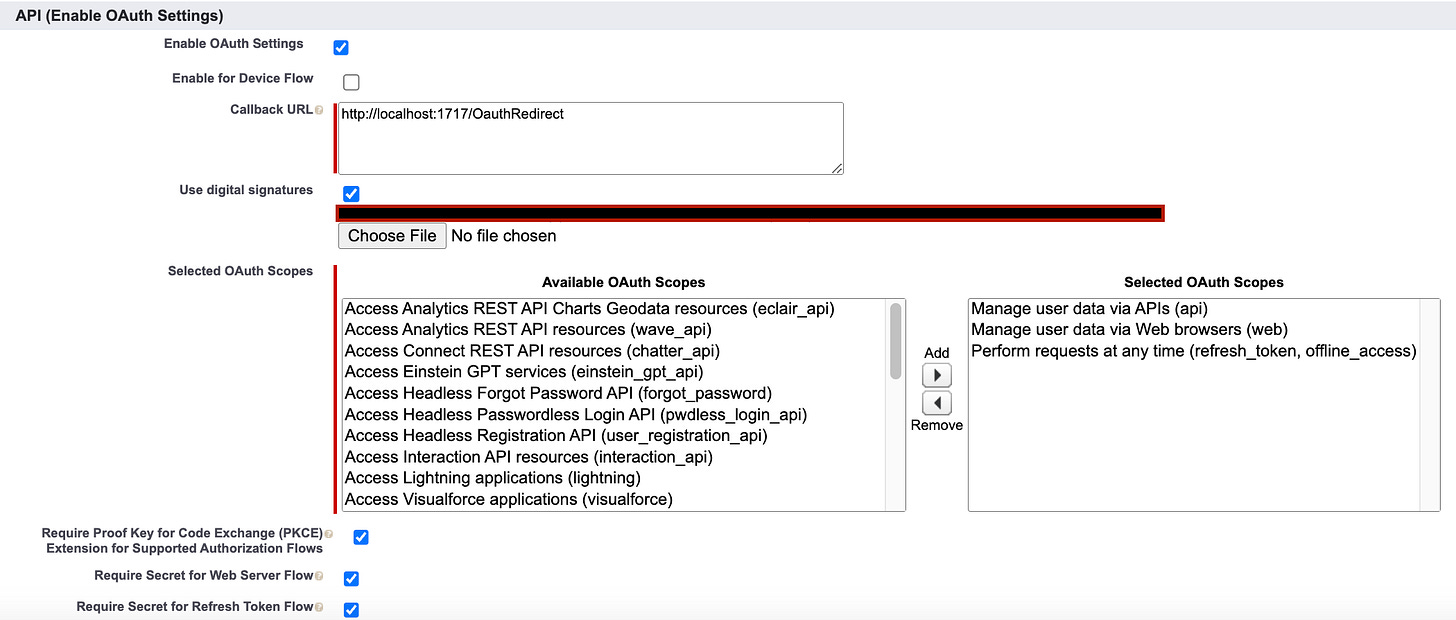
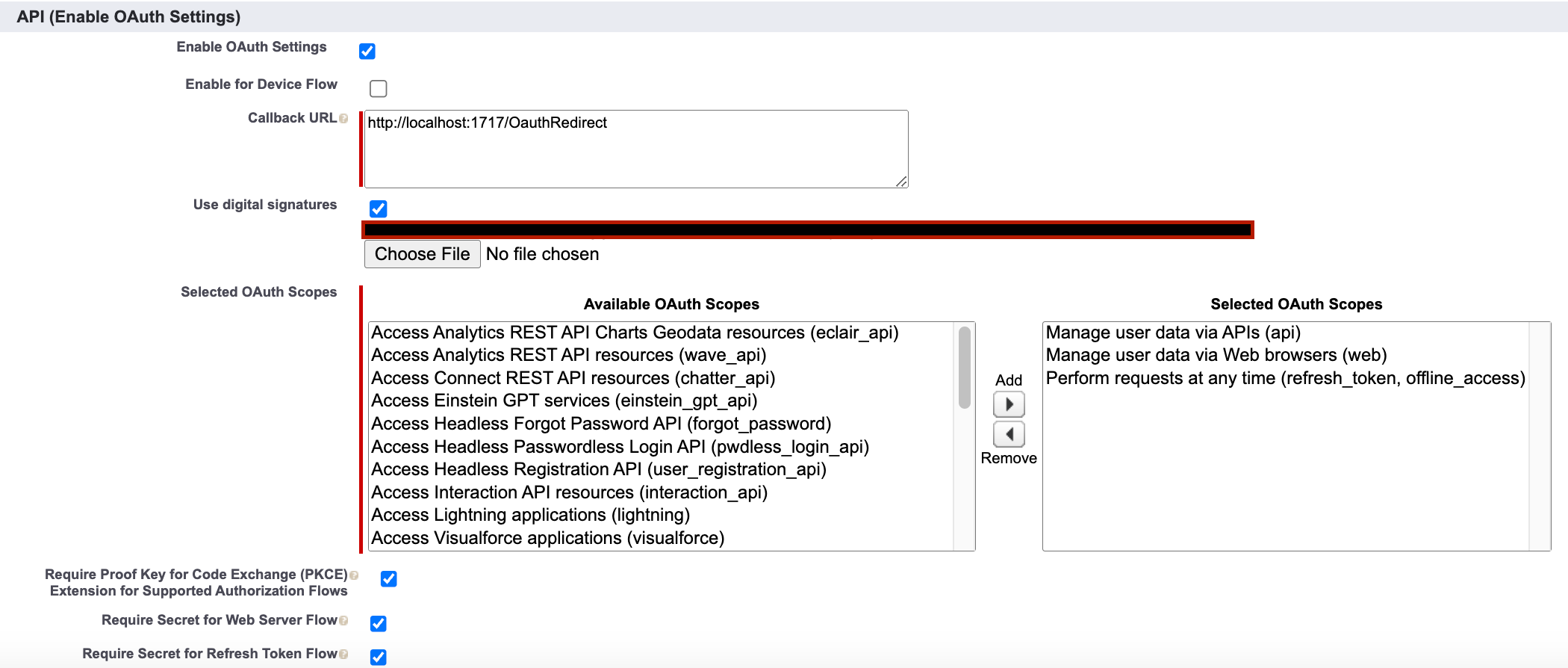
Create a connected app, assign it to the system administrator profile, and edit the app to have the following settings in “Manage Connected Apps”
Upload the certificate that was generated by generate-keys.sh (delete your private key that was generated as well)
I downloaded and installed the Salesforce Extension Pack, which has most of what you need for developing on their platform.
Create a new project with the command SFDX: Create Project With Manifest
Authorize your org with the command SFDX: Authorize Your Org
Create a local repository using git init, connect it to your remote github repo, do an initial commit and push
Tell VSCode where your Java 11 or 17 runtime is located so that it can launch the Apex Language Server
I created a repository specifically for this project.
Whenever necessary, I created pull requests from other branches and merged those branches into my main branch.
Connected CircleCI to my GitHub repo and set up my environment variables to be my sandbox username and password.
Set up Additional SSH Keys in CircleCi via the generate-keys.sh and delete your private key once done.
After creating a new project, CircleCI creates its own branch in your repo “circleci-project-setup”. This contains a standard config.yml file and a build folder. I switched to the branch in VSCode, pulled from this branch, updated my config.yml file, and created my build scripts. Then, I committed, pushed my code to the circleci-project-setup branch, created a pull request, merged my changes to main, and deleted the circleci-project-setup branch.
This branch was deleted after my merge, but the link above shows you the build scripts I’m using.
My config.yml file contains tons of notes. It’s not the neatest. There’s tons of room for optimization. I am aware of this, and if you’d like to give advice or help, email me.
What did I Learn?
1. Things Change Fast
Coding With The Force provides an amazing video that will get you started with building a pipeline. However, TONS of things have changed since its release date in December 2020. While building the pipeline, I ran into tons of vague errors that caused build failures. After days of reading, these errors were caused by the config.yml essentially being outdated. I essentially needed to create a new one from scratch. This was a cool learning process, but I definitely lost sleep. All good.
2. Leverage the Community
The Trailblazer Community, Youtube, Stackoverflow, Yaml Documentation, CircleCI Documentation, and Discord were a huge help in helping me solve build failures and strange errors I’d receive while working on this project. Absolutely nothing about this project is straightforward. There are tons of nuances that I believe aren’t clearly explained in the various pages of documentation that I’ve read through. Honestly, considering I spent days reading through forums this project felt like more of a group effort.
3. Leverage Technology to help you learn Technology
Believe it or not, Chat GPT helped tremendously. If you’re not using it, you’re seriously wasting time. Anytime I was stuck learning a concept, I could simply write a prompt along the lines of “explain X to me like I am a child”. That isn’t all! The follow-up questions I asked helped me gain an even better understanding of a concept.
4. Take a Break, Seriously
I can’t tell you how many times I’ve made a mistake and debugged for hours only to realize that I’ve missed a comma, hyphen, or period somewhere. When I run into situations like this, I clear my mind and go for a walk. There’s just something about changing gears that lets me relax while my subconscious solves the problem for me. I can’t explain it, but it works. Try it.
Special Thanks
I’d like to thank Coding with the Force for providing the information necessary to get started. Show them some love!